
How to Get WhatsApp Business API in India (2027 Guide)
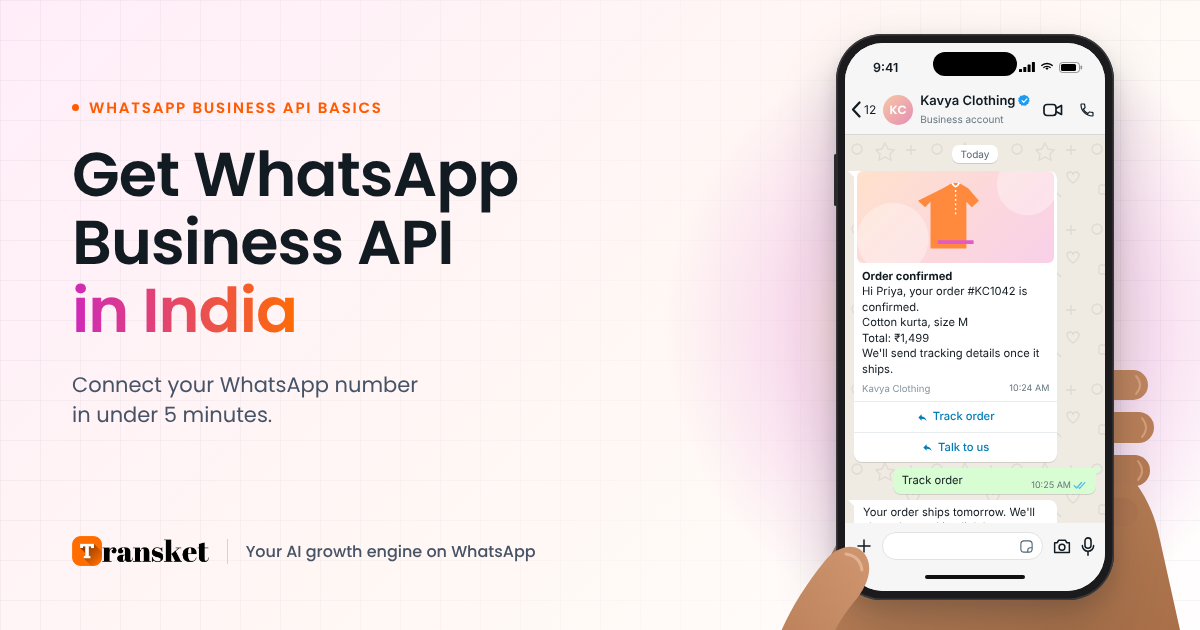
- Connect your WhatsApp number in under 5 minutes, if your number is ready. Log in with Meta, verify your number, add your display name. That's it.
- Setup needs 3 things. A Facebook account, a number you own that can take an SMS or call, and a free provider account like Transket.
- Your WhatsApp Business App number can stay. Coexistence runs the app on your phone and the API on the same number.
- A new account can contact 250 customers per 24 hours. Business verification lifts that to 2,000, and strong quality unlocks 10,000, 100,000 and then unlimited.
- Transket starts at ₹0 a month. Paid plans begin at ₹999 a month, and messages come out of your wallet at Meta's rates with 0% markup.
Most Indian D2C and e-commerce brands already talk to customers on WhatsApp. Moving to the WhatsApp Business API is what lets you run campaigns, order updates and bots from one dashboard. This guide shows how to get WhatsApp Business API in India, matching each step of Meta's official onboarding to the screen you see in Transket.
Connecting a number takes minutes. The delays brands hit are usually small ones: a verification code that never arrives, a display name Meta turns down, or a template sent back for edits. Each one has a fix further down.
Short answer: Getting the WhatsApp Business API in India takes two things: a phone number you own and a provider like Transket. Connect your WhatsApp number in under 5 minutes if your number is ready: log in with Meta, verify your number, add your display name. A new account can start chats with 250 customers in any 24 hours, rising to 2,000 once your business is verified after setup.
Limits quoted here follow Meta's WhatsApp Business Platform documentation.
What is the WhatsApp Business API?
The WhatsApp Business API lets a business send WhatsApp messages in volume through software, not a single phone. Meta's own name for it is the WhatsApp Business Platform. Most brands reach it through a provider dashboard, where they run campaigns, order updates, bots and a shared team inbox.
You'll meet these terms while setting up:
| Term | What it means |
|---|---|
| Business portfolio | The Meta Business Suite account for your company. Your WhatsApp assets belong to it. |
| WhatsApp account | Where your phone numbers and business identity sit. |
| Messaging account | Where your templates, billing and settings sit. Meta is dividing the older WhatsApp Business Account (WABA) into this and the WhatsApp account. |
| Embedded Signup | The Meta signup window that opens inside your provider's dashboard. |
| Template | A pre-approved message format. Starting a chat with a customer requires one. |
| Customer service window | A 24-hour period, starting when a customer messages you, in which your replies are unrestricted. |
| Coexistence | Running the WhatsApp Business App and the API on one number. |
Verdict: Every provider plugs into the same Meta platform, so the real difference is how simple the provider makes it.
What do you need before you start?
Setup needs 3 things, and campaigns need 2 more.
| What you need | Details | Needed for setup? |
|---|---|---|
| Facebook account | Used to sign in to Embedded Signup, with either Facebook or a Meta Business login | ✔ |
| Phone number | One you own, with country and area code, that can take an SMS or a voice call. Meta does not accept short codes or IVR numbers. | ✔ |
| Provider account | A free Transket account works | ✔ |
| Wallet top-up | Covers messages at Meta's rates, with 0% markup | ✖ Before you send |
| Approved template | Required to open a chat with a customer | ✖ Before campaigns |
| Business verification | Takes your limit to 2,000 customers per 24 hours | ✖ After setup |
No business portfolio yet? The signup flow lets you make one on the spot. Keep your business name, email, category, country, website and time zone handy.
Verdict: On day one, the only must-haves are a Facebook login and a number that belongs to you.
How to get WhatsApp Business API in India: 3 steps
Connect your WhatsApp number in under 5 minutes. Log in with Meta, verify your number, add your display name. That's it.
These setup steps work when your number is ready, meaning it is yours and can receive an SMS or call.
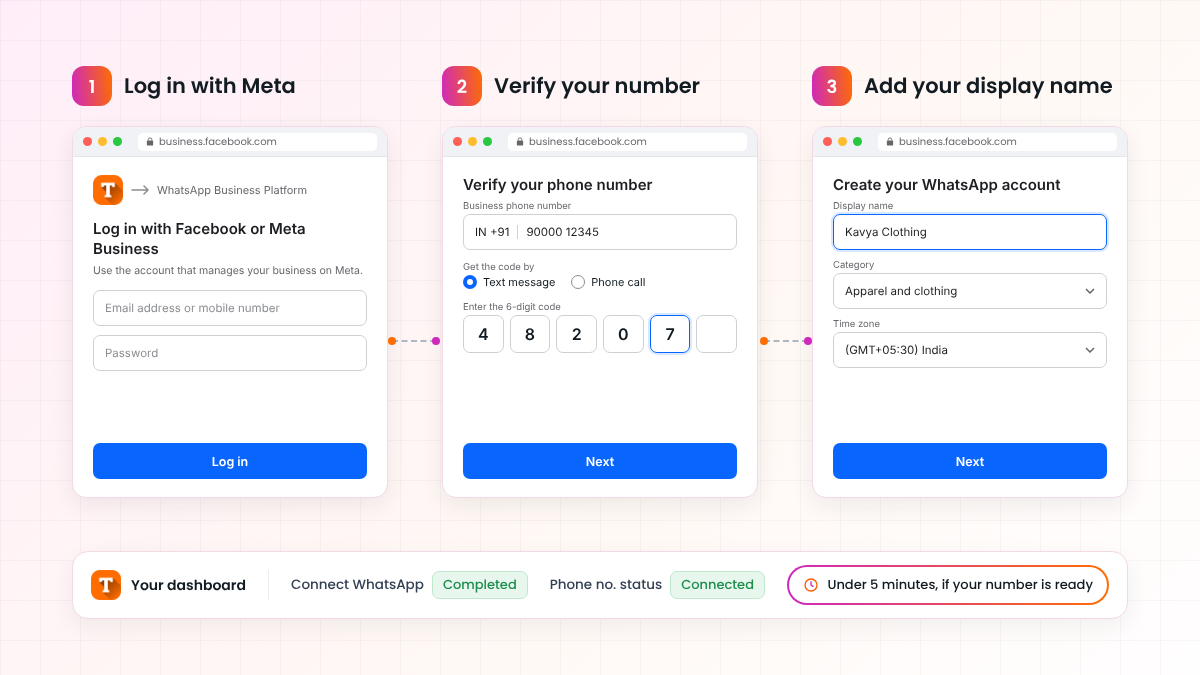
1. Log in with Meta. Create a free account at app.transket.in/signup, click connect, then sign in with Facebook or your Meta Business account. A business portfolio can be created in this same window if you need one.
2. Verify your number. Type in your business number and choose a code by SMS or voice call. For a number already on the WhatsApp Business App, Meta moves you to coexistence and shows a QR code to scan from the app. You'll also set a 6-digit two-step verification PIN, so store it somewhere safe.
3. Add your display name. Customers see this name on your WhatsApp profile. Matching it to Meta's display name guidelines keeps it from being rejected.
Verdict: Your number is connected after three steps, and everything else comes later.
Ready to connect your number? Start on the ₹0 plan and use Meta's Embedded Signup from inside Transket.
Try for free · Chat with us on WhatsApp
Using your existing WhatsApp Business App number
With coexistence, the WhatsApp Business App stays on your phone and the API runs on that same number. One-to-one replies from the app still work, and your chat history stays matched across both.
Leave the app open until the sync finishes. This only applies to WhatsApp Business App numbers. If the number is on personal WhatsApp, delete it from WhatsApp before registering, or pick a new number.
Verdict: Teams already selling on the WhatsApp Business App can keep their current number.
What happens after setup?
Three things come after setup, and you can start without waiting for any of them.
Messaging limits
Your messaging limit caps how many customers you can contact first in a 24-hour period, and good quality raises it. It only counts unique customers you reach outside the customer service window. Every number in a business portfolio draws from the same limit.
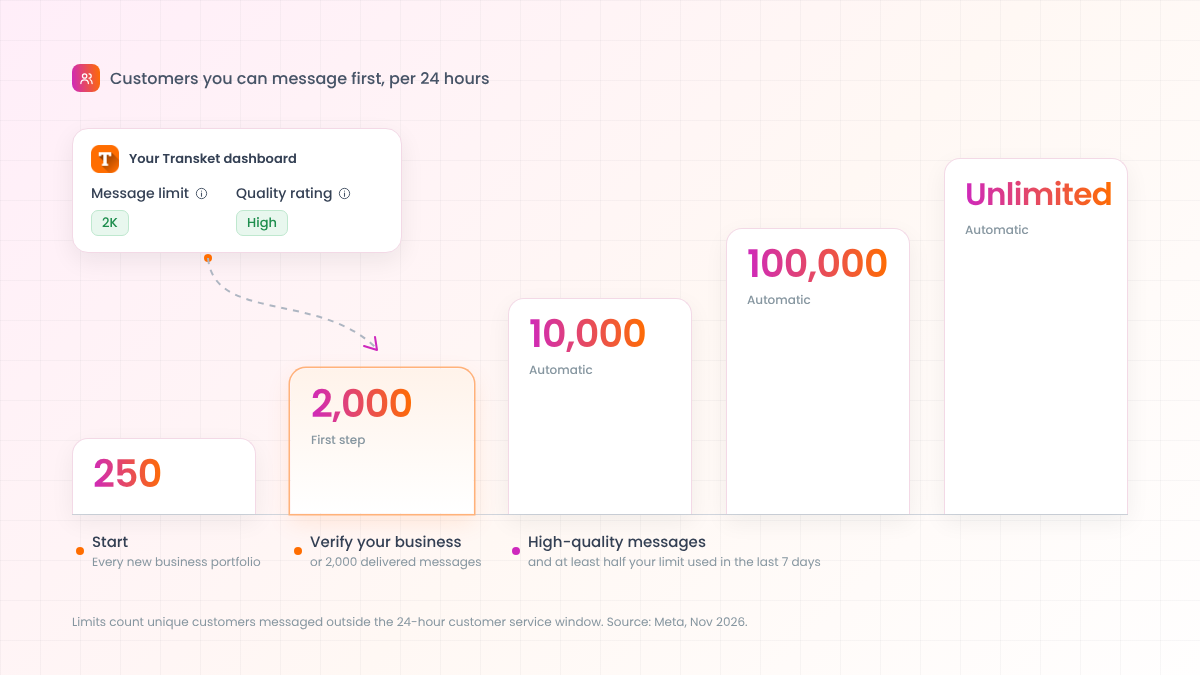
| Stage | Customers per 24 hours | How you get there |
|---|---|---|
| Start | 250 | Where every new business portfolio begins |
| First step | 2,000 | Get your business verified, or deliver messages to 2,000 unique customers within 30 days with high-quality templates |
| Automatic steps | 10,000, then 100,000, then unlimited | Keep quality high and use at least half your current limit over the past 7 days |
Customers who message you first don't count against this cap.
Business verification
Completing Meta's business verification takes your limit from 250 to 2,000 customers per 24 hours. It lifts your template cap too: 250 per Messaging account before verification, and up to 6,000 once you're verified with an approved display name. You complete it after setup.
Display name verification
Meta reviews your display name against its guidelines on its own once you move to a higher messaging limit. Setup isn't held up by it. A rejected name can be edited and sent for review again.
Next, top up your Transket wallet and submit your templates before the first campaign. Transket's library of ready-made templates, campaigns, bots and flows gives you a starting point instead of a blank page.
Verdict: The quickest way from 250 to 2,000 is to verify your business early.
Common setup problems and how to fix them
Almost every setup problem traces back to the number, the display name or a template.
| Problem | Fix |
|---|---|
| "Number already registered" | Remove it from personal WhatsApp, switch to coexistence if it's on the WhatsApp Business App, or choose a different number |
| Number not eligible for coexistence | Meta may want to see more use of the WhatsApp Business App first. Keep using the app for a while, or pick a new number. |
| Verification code not arriving | Try the other option, SMS or voice call. After too many requests, pause and retry later. |
| Display name rejected | Change it so it fits Meta's display name guidelines. Meta allows 10 changes in 30 days. |
| Template rejected | Correct the reason Meta gives and send it again. Our guide on why WhatsApp templates get rejected covers the common causes. |
Verdict: A number that can receive a code and a name that matches your brand keep setup moving.
Before your first campaign: get opt-in right
You need a customer's opt-in before you send them anything on WhatsApp. That means they shared their number with you and agreed to receive messages from your business.
Meta keeps the rules short: make the opt-in clear, show your business name, and stay within Indian law. You can collect it through your website, SMS, a phone call or face to face. Transket's Unified Consent Management records opt-ins and opt-outs, so your messages only reach people who said yes.
Verdict: Good opt-in keeps your quality rating healthy, and a healthy rating keeps your messaging limit growing.
Stop paying the WhatsApp Tax
Getting on the API isn't where Indian D2C brands lose money. The loss comes from messages that are delivered and charged, yet never acted on. Clean opt-in and well-written templates give each message a better shot at becoming an order.
Our complete guide to the WhatsApp Business API in India puts costs, limits and rules in one place. Check Transket's India pricing or estimate your monthly spend with the savings calculator.
Frequently asked questions
Can I use my existing WhatsApp number for the WhatsApp Business API?
Yes, as long as it's on the WhatsApp Business App. Coexistence lets you keep the app on your phone while Transket runs the API on that same number. Numbers on personal WhatsApp need to be deleted from WhatsApp first, or you can switch to a new number.
How long does it take to set up the WhatsApp Business API in India?
Under 5 minutes, if your phone number is ready. Through Meta's Embedded Signup you sign in with Facebook or your Meta business account, pick or create a business portfolio, verify the number and add a display name. Business and display name verification follow later and don't delay setup.
Do I need business verification to start using the WhatsApp Business API?
No, you can start without it. Verification comes after setup, so you begin at 250 customers per 24 hours. Once verified, your limit becomes 2,000, and with an approved display name your template allowance goes from 250 to as many as 6,000.
What documents and details do I need to sign up?
Setup only asks for a Facebook account and a number you own that can receive an SMS or call. Creating a new business portfolio adds a few details: business name, email, category, country, website and time zone. Documents come in later, and only for business verification.
Do I need a developer to set up the WhatsApp Business API on Transket?
No developer is needed. Meta's Embedded Signup runs inside the Transket dashboard, so connecting your number is a Meta login. Templates, campaigns and bots are built without code, and Transket's ready-made library of templates, campaigns, bots and flows gives you a head start.
How much does it cost to use the WhatsApp Business API on Transket in India?
You can start at ₹0, with paid plans from ₹999 a month. Messages are charged to your Transket wallet at Meta's rates with 0% markup. Your monthly total equals your plan plus your top-ups.