
Trusted by leading D2C and B2B brands worldwide
Consent Is a Spectrum, Not a Switch
A contact who never replied is not the same as one who said no. Transket tracks the state each contact is actually in.
Opted in
Said yes. Safe to reach with campaigns and updates.
Waiting on a reply
Asked, still deciding. Transket holds until they answer.
Not asked yet
Never prompted. A clear opt-in comes first.
Opted out
Said stop. Removed from every send automatically.
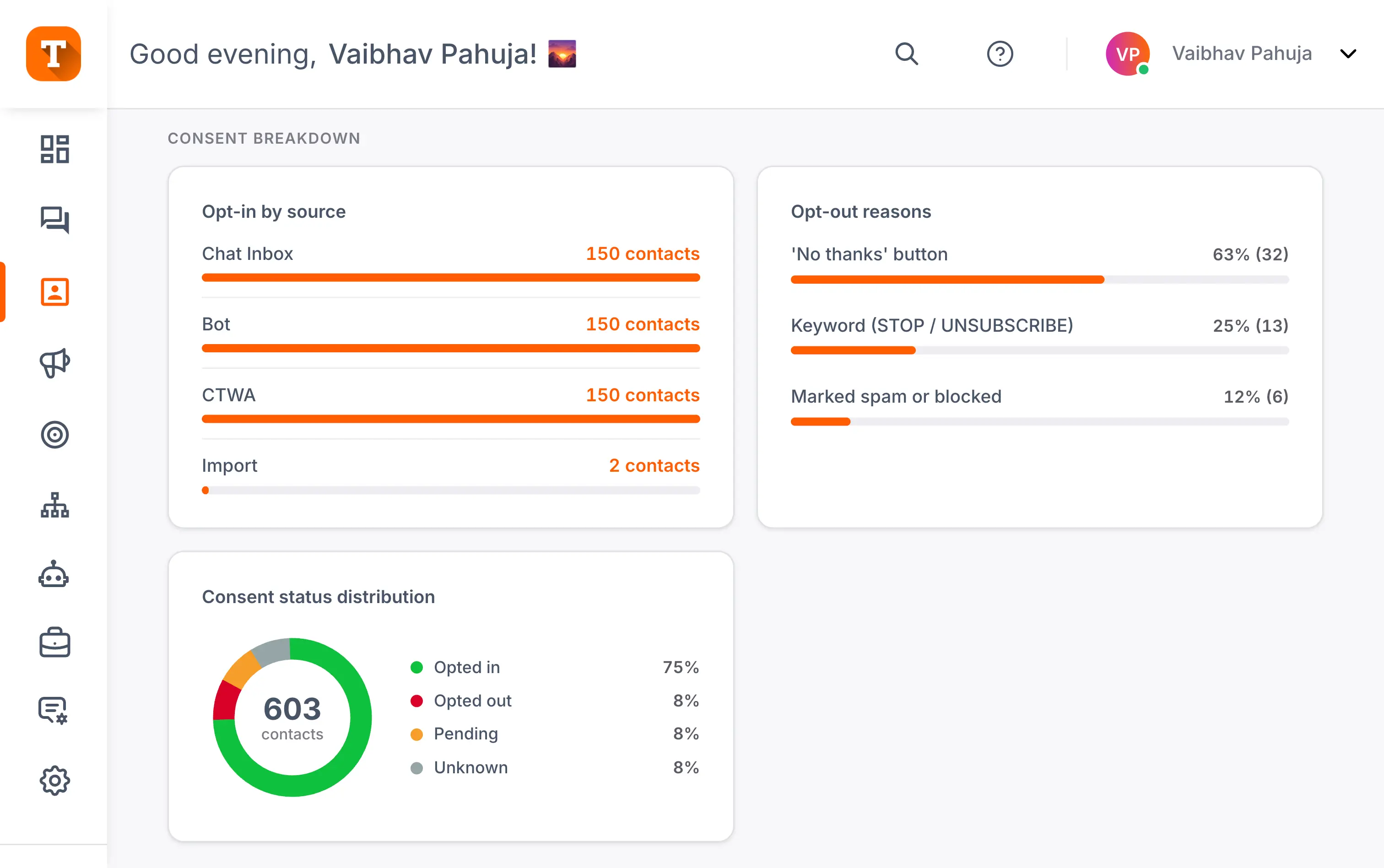
See Your Opt-In Health at a Glance
Transket gives you a dedicated consent dashboard, so the state of your list is never a mystery.
You’re all set. You’ll now receive updates from Transket on WhatsApp. Reply STOP any time to opt out.
You have been unsubscribed. Reply START to opt back in.
Hi! Transket would like to send you order updates and offers on WhatsApp. Reply STOP to opt out.
Prove Every Consent Change on Demand
Every consent change is recorded, so you always have the receipts.
Clean Consent Is How You Keep Growing
Good consent is not just a compliance box. It is what keeps your WhatsApp channel healthy over time.
Strong open and reply rates
Send to people who want to hear from you, and your open and reply rates stay strong.
Fewer blocks and reports
Message people who did not agree, and blocks and reports pile up, dragging down delivery for everyone on your list.
A protected quality score
Clean consent protects the quality score your whole account depends on.
Trust that compounds
When customers know a yes means a yes and a stop means a stop, they open your messages instead of muting you.
One Pillar of Your WhatsApp Growth Engine
WhatsApp Unified Consent Management is one of the four things Transket is built around. Together they turn WhatsApp into a channel you can run marketing, sales, and support from, all from one dashboard.
Advanced AI features
Clean, modern interface
Industry-leading consent management
Powerful no-code bots and flows
Consent is the foundation the rest sits on. Get it right, and every campaign you run starts from a cleaner, more engaged list.
Frequently asked questions
Everything you need to know about consent on WhatsApp and how Transket keeps it on record.
WhatsApp consent management is the process of tracking whether each customer has agreed to receive messages from your business, and respecting that choice. It decides who you can contact and who you cannot. Most tools reduce it to a single opt-in or opt-out flag, which misses a lot of nuance. Rules also vary by region, so check the requirements that apply to your market.
Opt-in means the customer actively agreed to hear from you; opt-out means they said stop. But those two states are not the whole picture. A contact who was never asked is not the same as one waiting to answer, and neither is the same as a no. Transket tracks four states: opted in, waiting on a reply, not asked yet, and opted out, so every contact is in the state they are actually in.
Because WhatsApp is a personal inbox, and unsolicited messages get blocked and reported fast. WhatsApp's policies require businesses to message only people who opted in, and accounts that ignore this see their quality rating drop and their messaging limits restricted. Consent is not just a legal nicety; it is what keeps your number able to send at all.
A clear opt-in request names your business, says what kind of messages the person will receive, and tells them how to opt out, with a privacy policy link where required. Transket keeps the exact message each customer saw, including the opt-out instruction, on their consent record. Regional rules may require more, so check the requirements in your market.
Yes. A dedicated consent dashboard shows how your contacts break down: opted in, opted out, waiting on a reply, and not asked yet, plus where opt-ins come from, whether that is your chat inbox, a bot, Click to WhatsApp Ads, or an import. You can also watch response rates on opt-in requests and learn why people opt out, with the full report exportable whenever you need it.
Yes, every one. The consent audit log records what changed, when, what action triggered it, and which source it came from, along with the exact message the customer saw. You can search by contact, switch between a timeline and a table, and export the log in a click when a customer or a reviewer asks. You always have the receipts.