Trusted by leading D2C and B2B brands worldwide
What Is a Click to WhatsApp Ad?
It is a normal Facebook or Instagram ad with one difference. Instead of sending people to a website, the button opens a WhatsApp chat with your business, so the conversation starts the moment they are interested.

New autumn collection just dropped. Message us for a first look.
Hi! Thanks for checking out our ad. Want to see the new collection or get 10% off your first order?
10:02From Ad to Conversation, in Four Steps
No forms, no landing pages, no waiting. This is the whole journey.
They see your ad
On Facebook or Instagram, where your customers already scroll.
They tap Send message
No landing page and no form to fill in first.
A WhatsApp chat opens
The conversation starts on WhatsApp, right away.
Your AI agent replies
The AI Agentic Bot greets, answers, and qualifies the lead, 24/7.
Why a Chat Beats a Landing Page
The same ad click, two very different outcomes.
- They fill in a form, then wait for an email or a call.
- Most visitors leave without doing anything.
- You paid for the click, but rarely get a conversation.
- A real conversation starts in seconds.
- Your AI agent answers and qualifies, day or night.
- You keep the contact and can follow up later.
Click to WhatsApp Ads on Meta
On Facebook and Instagram, WhatsApp is a built-in ad destination. There is no landing page to build, you point the ad straight at a chat.
Click to WhatsApp Ads on Google
Google has no native WhatsApp button, so you send the click to a trackable WhatsApp link instead. It works across Search, Display, and YouTube.
What Happens After the Click
Welcome & Fallback Bots
Always greet prospects instantly. Bots reply when your team can't, so no lead is ever left waiting.
Lead Tracking
Every lead is tagged with its ad source, making it simple to track their journey from click to conversion.
Performance Dashboard
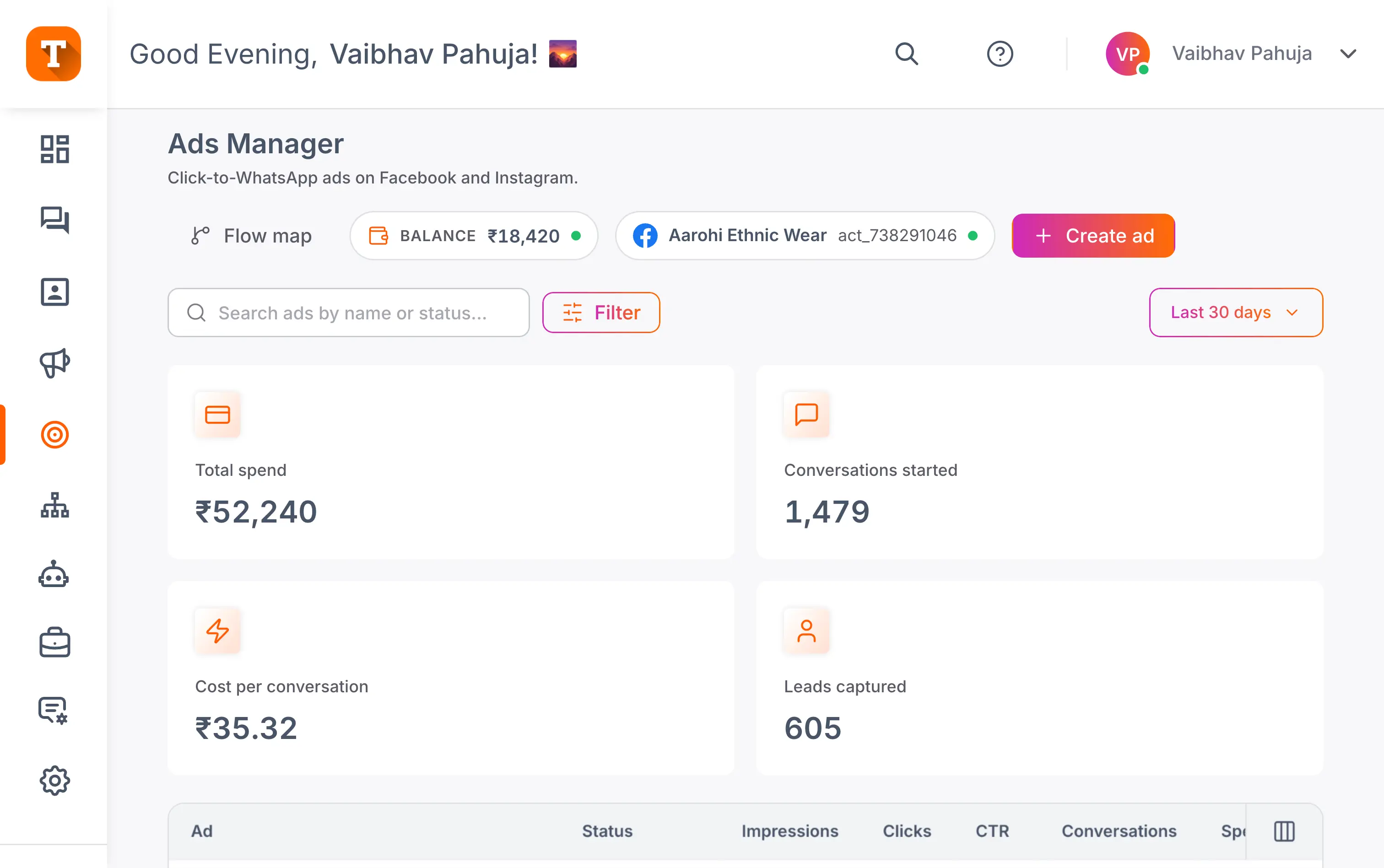
View impressions, clicks, chats, and conversions in one dashboard to see which campaigns deliver the highest ROI.
Advanced Analytics
Measure conversion rates, lead quality, and response times, helping you optimize ad spend with real-time insights.
Best-Practice Guidance
Built-in tips and prompts guide you to design high-converting campaigns that drive more chats and sales.
Frequently Asked Questions
Everything you need to know about Click to WhatsApp ads.
A Click to WhatsApp ad is a Facebook or Instagram ad whose button opens a WhatsApp chat with your business instead of sending people to a website. The conversation starts the moment someone is interested, with no landing page and no form in between. With Transket, your AI agent greets, answers, and qualifies that lead the second the chat opens.
Yes, with one difference. Google has no native WhatsApp button, so you use a trackable click-to-WhatsApp link as your ad's final URL instead. It works across Search, Display, and YouTube: a click opens WhatsApp, your AI agent replies, and the lead is tagged to the campaign. Meta remains the native home for these ads; Google extends the same funnel.
A WhatsApp chat opens with your business, your AI agent greets and qualifies the lead 24/7, and the contact is saved with their ad source attached. From there the conversation moves to booking, buying, or your team's shared inbox. Unlike a landing page visit, the click becomes a contact you keep and can follow up with later.
No. The ad's destination is the chat itself, so there is no landing page to build and no website required. Businesses that run entirely on Instagram and WhatsApp use these ads as their whole funnel: ad, chat, qualification, sale. If you do have a website, the ads simply become another entry point into the same inbox.
Because the same ad click gets two very different outcomes. On a landing page, visitors fill in a form and wait for an email, and most leave without doing anything. In a chat, a real conversation starts in seconds, your AI agent answers and qualifies day or night, and you keep the contact for follow-up. You paid for the click either way; the chat is the version where a conversation actually happens.
Every lead is tagged with its ad source, so you can follow the journey from click to conversation to conversion. The performance dashboard shows impressions, clicks, chats started, cost per conversation, and leads captured in one place, so you see which campaigns deliver and where to move budget. That closes the loop Meta's own reporting cannot see past the click.